How to Void a Check in The Desktop Software
Most check issues can be solved using the Reprint option. Voiding a check is used in the MOST extreme cases.
For circumstances where you do not have control of a check, and you require a reprint, it is necessary to Void the check.
Voiding a Check
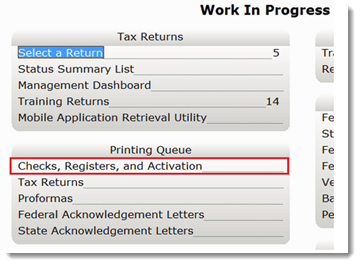
- From the Work In Progress (WIP) screen, in the Printing Queue panel, click Checks, Registers and Activation.
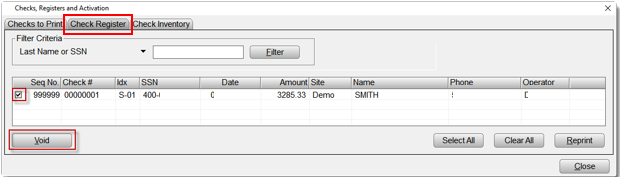
- Click the Check Register Tab
- Select the check to be voided
- Click the Void Button.
- Select your Bank
- Type the check number in the Check Number field,
- Type the reason for the void in the Note field, and then click OK.
The void request will be recorded in your check register.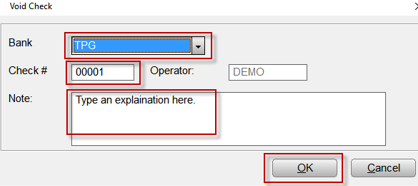
Important Note: The next steps vary by bank, yet you must also contact your bank for further instructions.
| Refund Advantage | Phone | Fax | Email/Website |
| ERO Support* | (800) 967-4934 | (877) 559-0558 | support@refund-advantage.com |
| Taxpayer Support | N/A | N/A | http://www.taxpayerinfo.com |
| Check Verification | (800) 967-4936 | (877) 559-0558 | https://www.verifytaxcheck.com |
| Main Page | N/A | N/A | https://www.refund-advantage.com |
| Republic Bank | Phone | Fax | Email/Website |
| ERO Support | (866) 491-1040 | (866) 300-3528 | enroll@republicbank.com |
| Taxpayer Support | (866) 581-1040 | (866) 300-3528 | https://www.republictaxpayer.com |
| Check Verification | (866) 631-1040 | N/A | https://www.republicverify.com |
| Main Page | N/A | N/A | https://www.republicrefund.com |
| Sales Team** | (888) 676-2056 | (502) 498-1267 | enroll@republicbank.com |
| Santa Barbara/TPG | Phone | Fax | Email/Website |
| Existing (to TPG) ERO Support | (800) 779-7228 | (858) 430-2795 | https://www.sbtpg.com/tax-pro-home |
| NEW (to TPG) ERO Support | (877) 901-5646 | (858) 430-2795 | https://www.sbtpg.com/tax-pro-home |