Error Message: “Login Refused, NO USER ID”
Symptoms
An error message appears when transmitting.
’Login Refused, NO USER ID’ 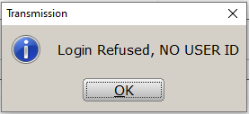
Cause
This message appears if either of the following are true:
- The User ID entered in the program is invalid.
- The account associated with the User ID is not active for the program year used.
NOTE: A User ID can be active for one year and not active for a prior year.
Resolution
Method 1: Verify the USER ID and Password.
- Log into the program as a user with administrator rights.
- From the top menu, click Setup > Office Setup.

- In the User ID field, verify the entered value is correct, making changes as necessary. Click OK to save the change.

- If the problem still persists, please contact Tier 2.