Skip to content
ERO Knowledge Base
  • Home
  • Installation & Networking
  • How to set up network and sharing center advanced settings

Installation & Networking

    • Error Message on Network Workstation: Unable to open safe.dat
    • Error Message: Startup Abort!!! >DB2 Load Error: (030)
    • Error message: Error 1324. The path XXXX contains an invalid character.
    • Error Message: Windows cannot access the specified device, path, or file When Opening The Program on a Workstation Computer
    • Error Message: Setup has detected that unInstallShield is in use… Error 432. While Installing or Uninstalling The Program
    • How to set the Icon Image on a Desktop Shortcut
    • Error Message: The windows installer service could not be accessed When Installing The Program
    • Switching out of S mode in Windows
    • How to Install The Topaz Signature Pad
    • How to Install The Program

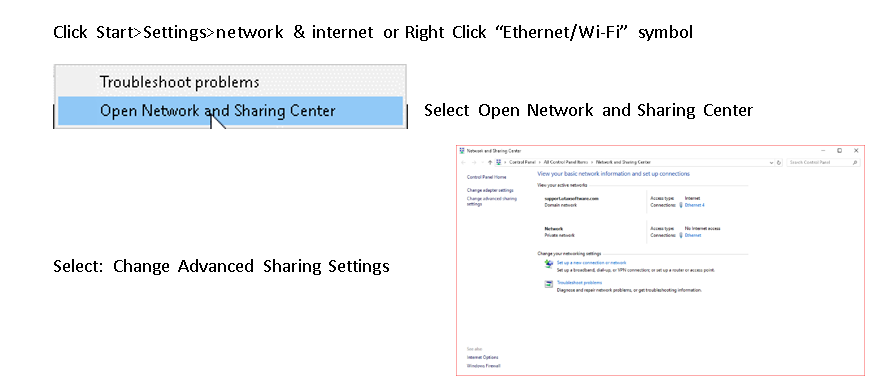
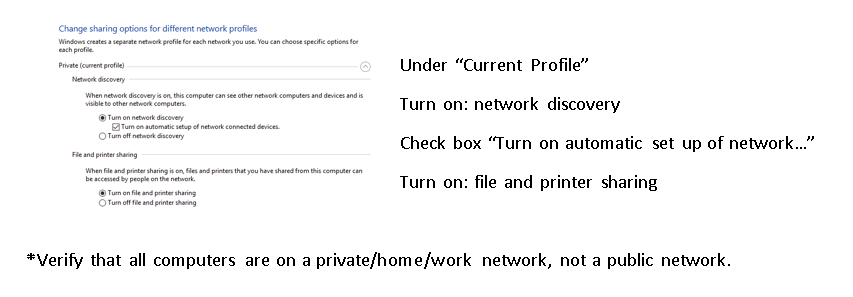
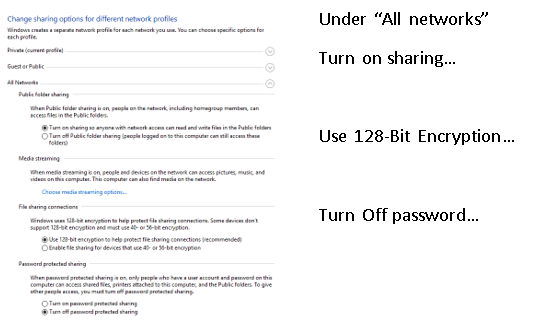
How to set up network and sharing center advanced settings

2 years ago
Support
0 minutes
Leave a Reply Cancel reply0

Your email address will not be published. Required fields are marked *


© 2026 ERO Knowledge Base